
Deploy to the platform
Deploy to the platform
One action builds every target platform and ships the result as a single bundle.
In Studio, open Devtools, then the Deploy tab, and start the deploy. The output streams into the panel as it runs.
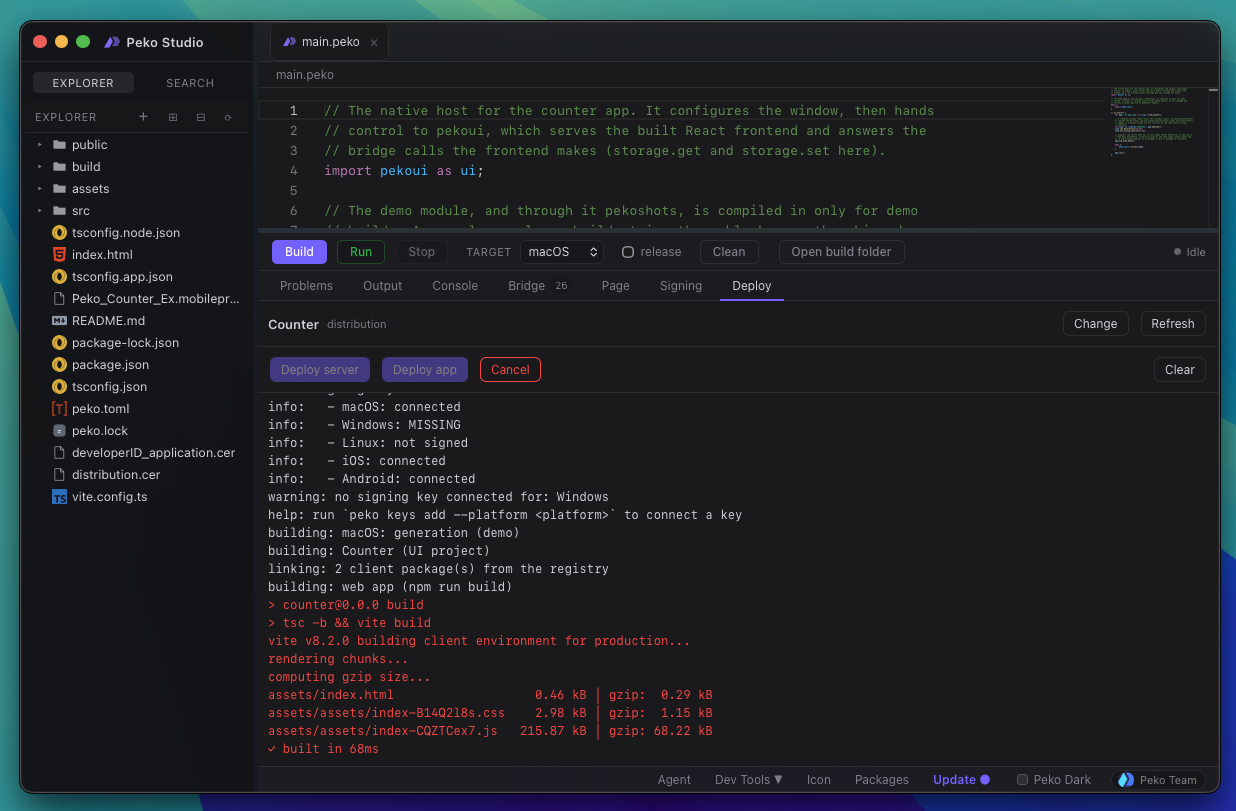
CLI:
peko deploy app
What it does
For each platform in [project].target_platforms it produces two builds:
| Build | How | Why |
|---|---|---|
| Generation | peko build --demo, debug, unsigned, demo fixtures and the automation driver included |
the run that generates store screenshots and recordings |
| Submission | peko build --release, signed, demo and automation stripped |
the store-ready binary |
Then it organizes the outputs, packs them into one compressed .pkdeploy under
build/deploy/, and uploads it.
This is the payoff for the previous two steps: the demo scripts drive the generation build, and the signing keys sign the submission build. Neither is optional for a store, and the two never mix.
Before it starts
It confirms the target platforms, then confirms a signing key is connected for each platform that requires one. A platform with no key stops the deploy unless you allow unsigned builds.
Non-Apple targets always build locally. Apple targets build locally on a Mac. On a non-Mac host a remote Apple builder is required.
Options worth knowing
CLI:
peko deploy app --yes               # no prompts, for CI
peko deploy app --no-upload         # build the bundle, keep it local
peko deploy app --allow-unsigned    # proceed without a key
--no-upload is the one to use the first time. You get the whole bundle on disk
and can look at what would have been sent before sending it.
Signing keys are not uploaded. The bundle carries signed binaries, not the material that signed them.